
Working with Microsoft Office files within Google's productivity suite is a seamless and frustration-free experience.
AI debate verdict and arguments
⚠️ AI-generated information only; not professional advice
Completed October 14, 2026
Verdict
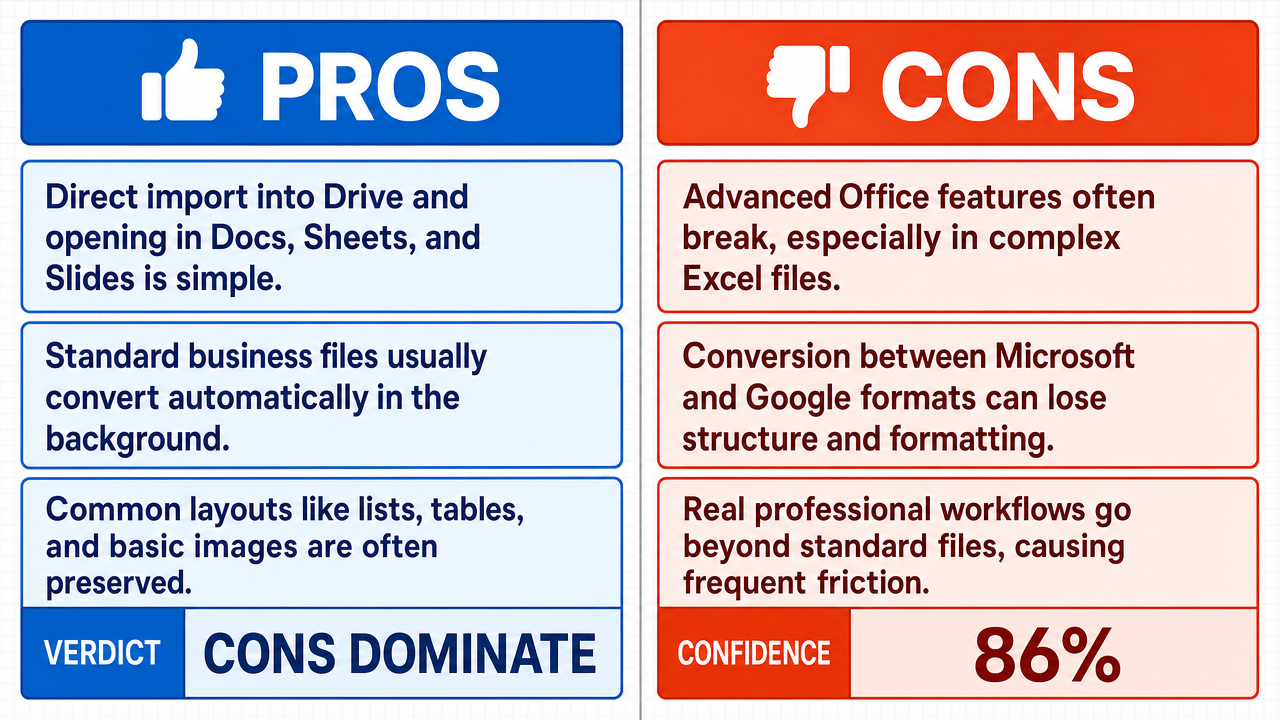
Verdict: likely FALSE (86%)
Web Report: https://solsice.com/public/debates/working-with-microsoft-office-files-within-google-s-producti-197805279bf9
This section provides a brief overview of the key arguments. You do not need to read the full detailed report below.
✅ Key PRO arguments:
- ■Google Workspace is designed for frictionless interoperability, allowing users to directly import .docx, .xlsx, and .pptx files into Google Drive where they are automatically converted into editable Google Docs , Sheets, and Slides formats while preserving core formatting, lists, tables, and basic styling.
- ■The conversion process runs as a background service with a high success rate for standard business documents, eliminating the need for users to manually manage file versions or seek third-party conversion tools.
- ■Google's conversion libraries are continuously updated to handle common professional layouts, including multi-level lists , embedded tables , and basic image anchoring , making the experience seamless for the vast majority of users working with standard business documents.
❌ Key ANTI arguments:
- ■Interoperability between Microsoft Office and Google Workspace is structurally flawed: Microsoft Excel 's engine supports complex array formulas , Power Query , and sophisticated VBA macros that cannot be replicated in Google Sheets , rendering professional-grade .xlsx files functionally broken for their intended purpose.
- ■The structural translation from Microsoft's XML-based formats (.docx, .xlsx) to Google's web-native formats is a lossy process that frequently fails to preserve the very elements claimed as 'core,' such as nested tables and specific formatting properties.
- ■The affirmative's reliance on 'standard business documents' is a hidden premise that ignores the reality of complex professional workflows, where the structural integrity of advanced files is fundamentally compromised upon conversion.
💭 Conclusion: False. The assertion that working with Microsoft Office files within Google's productivity suite is seamless and frustration-free is not supported by the evidence presented. The negative side successfully demonstrated that the conversion process from Microsoft's XML-based formats to Google's web-native formats is inherently lossy, particularly for complex professional documents containing advanced features like VBA macros , Power Query , array formulas , and nested tables . While the affirmative made valid points about standard business documents converting adequately, the compound claim requires both 'seamless' and 'frustration-free' experiences across all use cases, and the structural limitations of browser-based rendering engines create unavoidable friction for advanced workflows. The judge's high confidence in the FALSE verdict reflects the strength of the technical arguments about fundamental architectural incompatibilities between the two platforms.
🔬 DeepResearch Result: likely FALSE ❌ (86%)
Assertion: Working with Microsoft Office files within Google's productivity suite is a seamless and frustration-free experience.
Participating models: deepseek-v3.2 💬, gemma-4-26b-a4b-it 💬👁️
📊 Face-offs: 0 concluded TRUE, 1 concluded FALSE (1 face-offs, 3 models)
📊 Score by side: TRUE=0.00, FALSE=0.86
🏅 Model score changes:
minimax-m3 💬👁️: +9
✅ PRO Arguments:
- ■Google Workspace is designed for frictionless interoperability, allowing users to directly import .docx, .xlsx, and .pptx files into Google Drive where they are automatically converted into editable Google Docs , Sheets, and Slides formats while preserving core formatting, lists, tables, and basic styling. deepseek-v3.2 💬
- ■The conversion process runs as a background service with a high success rate for standard business documents, eliminating the need for users to manually manage file versions or seek third-party conversion tools. deepseek-v3.2 💬
- ■Google's conversion libraries are continuously updated to handle common professional layouts, including multi-level lists , embedded tables , and basic image anchoring , making the experience seamless for the vast majority of users working with standard business documents. deepseek-v3.2 💬
❌ ANTI Arguments:
- ■Interoperability between Microsoft Office and Google Workspace is structurally flawed: Microsoft Excel 's engine supports complex array formulas , Power Query , and sophisticated VBA macros that cannot be replicated in Google Sheets , rendering professional-grade .xlsx files functionally broken for their intended purpose. gemma-4-26b-a4b-it 💬👁️
- ■The structural translation from Microsoft's XML-based formats (.docx, .xlsx) to Google's web-native formats is a lossy process that frequently fails to preserve the very elements claimed as 'core,' such as nested tables and specific formatting properties. gemma-4-26b-a4b-it 💬👁️
- ■The affirmative's reliance on 'standard business documents' is a hidden premise that ignores the reality of complex professional workflows, where the structural integrity of advanced files is fundamentally compromised upon conversion. gemma-4-26b-a4b-it 💬👁️
- ■There is a structural mismatch between Microsoft's desktop-oriented rendering engine and Google's browser-based engine , which causes complex table properties and advanced document features to break during conversion, creating significant user friction. gemma-4-26b-a4b-it 💬👁️
💭 Reasoning: False. The assertion that working with Microsoft Office files within Google's productivity suite is seamless and frustration-free is not supported by the evidence presented. The negative side successfully demonstrated that the conversion process from Microsoft's XML-based formats to Google's web-native formats is inherently lossy, particularly for complex professional documents containing advanced features like VBA macros, Power Query, array formulas, and nested tables. While the affirmative made valid points about standard business documents converting adequately, the compound claim requires both 'seamless' and 'frustration-free' experiences across all use cases, and the structural limitations of browser-based rendering engines create unavoidable friction for advanced workflows. The judge's high confidence in the FALSE verdict reflects the strength of the technical arguments about fundamental architectural incompatibilities between the two platforms.
📋 PRO Facts:
• Google Workspace supports native import and conversion of .docx, .xlsx, and .pptx files into Google Docs, Sheets, and Slides formats.
• Google's conversion libraries are continuously updated to handle common professional layouts including multi-level lists, embedded tables, and basic image anchoring.
• The conversion process operates as a background service with a high success rate for standard business documents.
📋 ANTI Facts:
• Microsoft Excel supports complex array formulas, Power Query, and sophisticated VBA macros that cannot be replicated in Google Sheets.
• The conversion from Microsoft's XML-based formats to Google's web-native formats is a lossy process.
• Complex table properties such as nested tables and specific formatting frequently fail to preserve during conversion.
• There is a structural mismatch between Microsoft's desktop-oriented rendering engine and Google's browser-based engine.
| Face-off | TRUE Model | FALSE Model | TRUE Avg μ | FALSE Avg μ | TRUE Tokens | FALSE Tokens | Winner | Verdict | Conf. |
|---|---|---|---|---|---|---|---|---|---|
| #1 | deepseek-v3.2 💬 | gemma-4-26b-a4b-it 💬👁️ | 0.333 | 0.257 | 8 | 2 | TRUE | FALSE | 86% |
The following technical terms, abbreviations, and domain-specific concepts are referenced throughout this debate transcript. Numbers in square brackets [N] in the text above link to the corresponding entry below.
[1] .docx — Microsoft Word Open XML Document — The default file format for Microsoft Word documents, introduced with Office 2007 and based on the Office Open XML standard.
[2] .pptx — Microsoft PowerPoint Open XML Presentation — The default file format for Microsoft PowerPoint presentations, introduced with Office 2007 and based on the Office Open XML standard.
[3] .xlsx — Microsoft Excel Open XML Spreadsheet — The default file format for Microsoft Excel workbooks, introduced with Office 2007 and based on the Office Open XML standard.
[4] Array formulas — Excel formulas that perform multiple calculations on one or more sets of values and return either a single result or multiple results across a range of cells.
[5] Browser-based engine — Software component that processes and displays content within a web browser, as opposed to a native desktop application.
[6] Bullet hierarchies — Nested list structures in which different levels use distinct bullet styles or symbols to indicate hierarchy.
[7] Cell margins — The spacing between the content of a table cell and its borders, controlling the internal padding of the cell.
[8] Conversion libraries — Software code modules that handle the translation of files from one format to another.
[9] Desktop-oriented rendering — The display and layout processing optimized for native desktop applications rather than web browsers.
[10] Embedded tables — Tables placed within a document or within another table, as opposed to standalone spreadsheet files.
[11] Fallacy of marginal subset — A logical fallacy in which an extreme or atypical case is presented as representative of the general experience or population.
[12] Google Docs — Google's web-based word processing application, part of the Google Workspace productivity suite.
[13] Google Drive — Google's cloud-based file storage and synchronization service that integrates with Google Workspace applications.
[14] Google Sheets — Google's web-based spreadsheet application, part of the Google Workspace productivity suite.
[15] Google Slides — Google's web-based presentation application, part of the Google Workspace productivity suite.
[16] Google Workspace — Google's suite of cloud-based productivity and collaboration tools, including Docs, Sheets, Slides, Drive, and Gmail.
[17] Headers, footers — Headers and footers — Text or graphical elements that appear at the top (header) or bottom (footer) of every page in a document.
[18] Hidden premise — An unstated assumption that underlies and is required to support an argument's conclusion.
[19] Image anchoring — The method by which images are positioned and locked relative to text or other elements within a document layout.
[20] Indentation increments — Specific spacing values used to define how far each level of a list is indented from the margin.
[21] Lossy process — A conversion or compression process that results in permanent loss of some original information or fidelity.
[22] Microsoft Excel — Microsoft's desktop spreadsheet application, part of the Microsoft Office productivity suite.
[23] Microsoft PowerPoint — Microsoft's desktop presentation application, part of the Microsoft Office productivity suite.
[24] Microsoft Word — Microsoft's desktop word processing application, part of the Microsoft Office productivity suite.
[25] Multi-level lists — Lists that contain multiple hierarchical levels of indentation, often with different numbering or bullet styles at each level.
[26] Nested tables — Tables placed within the cells of another table, creating a hierarchical table structure.
[27] Numbered paragraphs — Paragraphs formatted with automatic sequential numbering, often used in legal or structured documents.
[28] Power Query — A data connection and transformation tool built into Microsoft Excel for importing, cleaning, and reshaping data from various sources.
[29] Rendering engine — Software component responsible for displaying visual content, including layout, formatting, and graphics.
[30] Round-trip fidelity — The degree to which a file retains its original structure, formatting, and content after being converted to another format and back.
[31] Round-tripping — The process of converting a file from one format to another and then back again, often to test conversion fidelity.
[32] Row height constraints — Specifications that control the minimum, maximum, or fixed height of rows in a table.
[33] Structural integrity — The preservation of a file's logical organization, formatting, and functional elements during conversion or editing.
[34] Structural mismatch — Incompatibility between the underlying data structures or formatting models of different file formats.
[35] Structural translation — The conversion of data and formatting between different file format structures.
[36] VBA macros — Visual Basic for Applications macros — Automated scripts written in Visual Basic for Applications that extend functionality within Microsoft Office applications.
[37] Web-native formats — File formats designed specifically for use within web-based applications and browsers, as opposed to desktop software.
[38] XML-based formats — Extensible Markup Language-based formats — File formats that use XML to structure and store their data, such as the Office Open XML standards used by .docx, .xlsx, and .pptx.
Face-off transcripts
- ■
Ownership & Trade Secrets. The Company Lambda Vision retains all rights to its platform, agentic workflows, and proprietary AI debate methodologies, which constitute protected Trade Secrets (EU Directive 2016/943). Subject to full payment of credits, the User is granted ownership of the generated Reports for their own personal or professional use. Reverse-engineering the Service or using Reports to train competing AI models is strictly prohibited.
- ■
No Professional Advice. Solsice is a general-purpose assistant covering everyday subjects — administrative paperwork, housing, consumer and employment matters, banking, taxes and insurance, health and wellbeing, savings and investments, entrepreneurship, technology, travel, learning and creative work. Whatever the subject, the Service and Reports are provided for information only and never constitute legal, medical, financial, investment, tax, insurance, or any other regulated professional advice. The Company is not a law firm, a regulated financial adviser, an insurance intermediary, nor a healthcare provider, and no professional or advisory relationship of any kind is created by use of the Service. Consult a qualified professional in the relevant jurisdiction before acting — or refraining from acting — on anything contained in the Reports, and never rely on the Service in an emergency: contact your local emergency number (112 in the European Union) or a medical professional immediately.
- ■
AI-Generated Content, Sources and Viewpoints. Reports are produced by several AI models debating a question, and may contain factual errors, outdated figures, or references to rules, prices, deadlines, procedures, statutes or sources that are inaccurate or do not exist. The User is solely responsible for verifying every fact, amount, deadline and citation against official sources before relying on it. Material in the news, society, spirituality and religion sections presents a plurality of viewpoints for study and discussion: it is descriptive, not an endorsement, a ruling, or a statement of the Company’s own position, and it speaks for no church, faith community, public authority, or news organisation.
- ■
Liability & Governing Law. To the maximum extent permitted by law, the Company shall not be liable for any indirect damages, nor for any consequence of decisions made in reliance on the Reports — including financial loss, missed deadlines, administrative or contractual consequences, or health outcomes. These Terms are governed by French law. Any disputes shall be subject to the exclusive jurisdiction of the Courts of Paris, France.