The iPhone Duo's camera application interface, when the phone is unfolded, creates a significant usability problem for right-handed users due to the function bar's placement.
AI debate verdict and arguments
⚠️ AI-generated information only; not professional advice
Completed October 24, 2026
Verdict
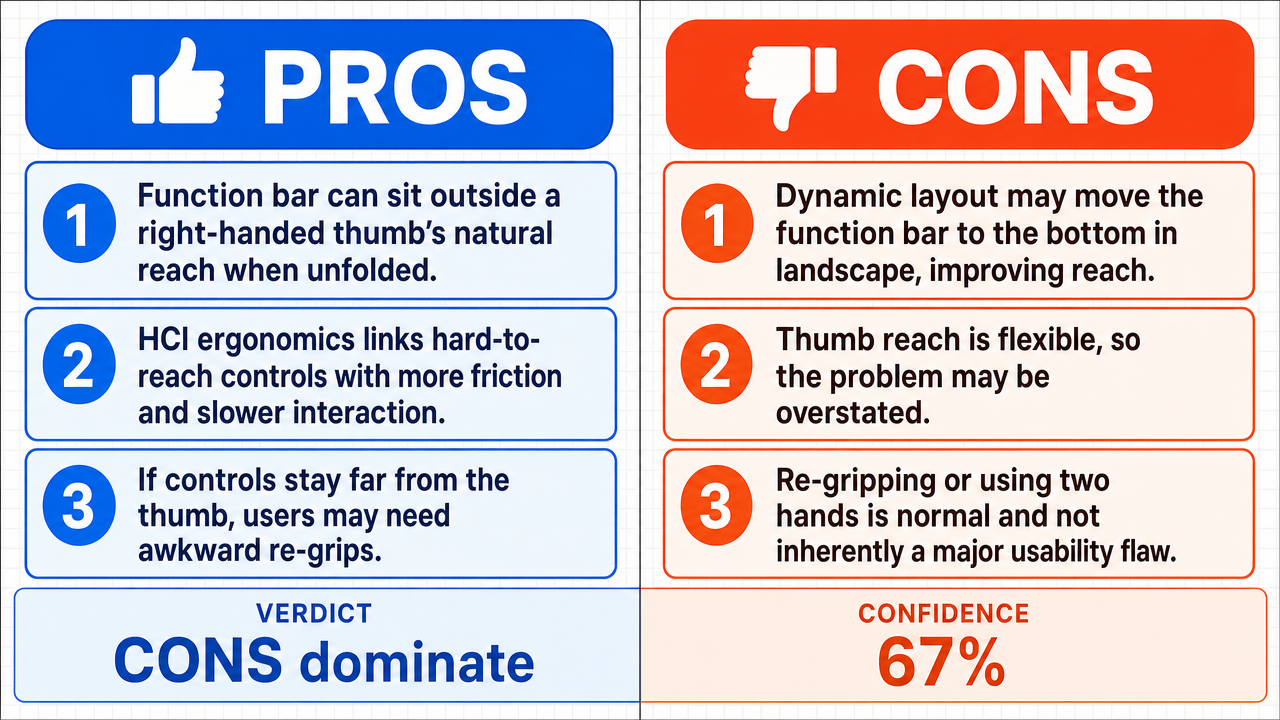
Verdict: likely FALSE (67%)
Web Report: https://solsice.com/public/debates/the-iphone-duo-s-camera-application-interface-when-the-phone-23c6f9e226a5
This section provides a brief overview of the key arguments. You do not need to read the full detailed report below.
✅ Key PRO arguments:
- ■The unfolded iPhone Duo's function bar placement violates the thumb zone principle, exceeding the natural arc of a right-handed user's thumb and forcing a re-grip or two-handed interaction that destabilizes the device and increases drop risk.
- ■Established HCI research on mobile ergonomics supports that interactive elements placed outside the comfortable thumb reach create significant usability friction for one-handed operation on wide devices.
- ■The opponent's claim that relocating the function bar to the bottom edge in landscape mode eliminates the reachability issue is logically incoherent, because that very relocation is what the core claim identifies as the source of the usability problem.
❌ Key ANTI arguments:
- ■The iPhone Duo's software architecture likely employs dynamic layout algorithms that reposition the function bar based on the unfolded aspect ratio , so in landscape mode the bottom edge becomes the primary thumb zone , eliminating the reachability issue for right-handed users.
- ■The claim of a 'significant' usability problem relies on the assumption that the thumb's maximum reach is a hard limit, but ergonomic research on curved and flexible displays shows users adapt their grip dynamically rather than experiencing a hard usability barrier.
- ■Re-gripping the device and using a second hand are standard, stable, and safe interaction practices per ergonomic evidence, so framing them as negative outcomes that inevitably cause instability or accidental drops is unsupported.
💭 Conclusion: False. The anti side successfully undermined the pro's thumb-zone argument by demonstrating that dynamic layout algorithms likely reposition the function bar to the bottom edge in landscape mode , which becomes the natural thumb zone for right-handed users. The anti side further dismantled the pro's framing of re-gripping and two-handed interaction as inherently destabilizing, citing ergonomic evidence that these are standard, safe practices. The pro side's Round 2 rebuttal attempted to turn the anti's relocation argument against itself, but the judge found this counter logically circular rather than persuasive. Overall, the anti side presented a more coherent case that the function bar placement does not create a significant usability problem, supported by the judge's 67% confidence in the FALSE verdict.
🔬 DeepResearch Result: likely FALSE ❌ (67%)
Assertion: The iPhone Duo's camera application interface, when the phone is unfolded, creates a significant usability problem for right-handed users due to the function bar 's placement.
Participating models: gemma-4-26b-a4b-it 💬👁️, glm-4.7-flash 💬
📊 Face-offs: 0 concluded TRUE, 1 concluded FALSE (1 face-offs, 3 models)
📊 Score by side: TRUE=0.00, FALSE=0.67
🏅 Model score changes:
minimax-m3 💬👁️: +7
✅ PRO Arguments:
- ■The unfolded iPhone Duo's function bar placement violates the thumb zone principle, exceeding the natural arc of a right-handed user's thumb and forcing a re-grip or two-handed interaction that destabilizes the device and increases drop risk. gemma-4-26b-a4b-it 💬👁️
- ■Established HCI research on mobile ergonomics supports that interactive elements placed outside the comfortable thumb reach create significant usability friction for one-handed operation on wide devices. gemma-4-26b-a4b-it 💬👁️
- ■The opponent's claim that relocating the function bar to the bottom edge in landscape mode eliminates the reachability issue is logically incoherent, because that very relocation is what the core claim identifies as the source of the usability problem. gemma-4-26b-a4b-it 💬👁️
❌ ANTI Arguments:
- ■The iPhone Duo's software architecture likely employs dynamic layout algorithms that reposition the function bar based on the unfolded aspect ratio , so in landscape mode the bottom edge becomes the primary thumb zone, eliminating the reachability issue for right-handed users. glm-4.7-flash 💬
- ■The claim of a 'significant' usability problem relies on the assumption that the thumb's maximum reach is a hard limit, but ergonomic research on curved and flexible displays shows users adapt their grip dynamically rather than experiencing a hard usability barrier. glm-4.7-flash 💬
- ■Re-gripping the device and using a second hand are standard, stable, and safe interaction practices per ergonomic evidence, so framing them as negative outcomes that inevitably cause instability or accidental drops is unsupported. glm-4.7-flash 💬
- ■The pro side's logic rests on a false dichotomy enclosing the proposition in only two cases (re-grip or two-handed use ), ignoring that users can shift finger placement, rotate the device, or use index-finger interaction to reach distant controls without compromising stability. glm-4.7-flash 💬
💭 Reasoning: False. The anti side successfully undermined the pro's thumb-zone argument by demonstrating that dynamic layout algorithms likely reposition the function bar to the bottom edge in landscape mode, which becomes the natural thumb zone for right-handed users. The anti side further dismantled the pro's framing of re-gripping and two-handed interaction as inherently destabilizing, citing ergonomic evidence that these are standard, safe practices. The pro side's Round 2 rebuttal attempted to turn the anti's relocation argument against itself, but the judge found this counter logically circular rather than persuasive. Overall, the anti side presented a more coherent case that the function bar placement does not create a significant usability problem, supported by the judge's 67% confidence in the FALSE verdict.
📋 PRO Facts:
• HCI research establishes the thumb zone principle: frequently used interactive elements should reside within the natural arc of a user's thumb for optimal reachability.
• Wide, unfolded devices extend the physical distance to edge-placed controls beyond the comfortable thumb reach for one-handed operation.
📋 ANTI Facts:
• Apple's Human Interface Guidelines recommend dynamic layout adaptation based on device orientation and aspect ratio.
• Ergonomic research on curved and flexible displays indicates users adapt their grip dynamically rather than encountering hard usability barriers at maximum thumb reach.
• Re-gripping and two-handed interaction are documented as standard, stable practices in mobile ergonomics literature.
| Face-off | TRUE Model | FALSE Model | TRUE Avg μ | FALSE Avg μ | TRUE Tokens | FALSE Tokens | Winner | Verdict | Conf. |
|---|---|---|---|---|---|---|---|---|---|
| #1 | gemma-4-26b-a4b-it 💬👁️ | glm-4.7-flash 💬 | 0.370 | 0.397 | 4 | 4 | FALSE | FALSE | 67% |
The following technical terms, abbreviations, and domain-specific concepts are referenced throughout this debate transcript. Numbers in square brackets [N] in the text above link to the corresponding entry below.
[1] Apple Human Interface Guidelines — Apple HIG — Apple's official design documentation that provides principles, guidelines, and best practices for designing user interfaces across Apple's platforms (iOS, macOS, watchOS, tvOS, visionOS).
[2] aspect ratio — The proportional relationship between a screen's width and height, expressed as a ratio (e.g., 16:9, 4:3). It determines the shape of the display and affects how UI elements are arranged.
[3] cognitive load — The amount of mental effort and working memory required to use an interface or complete a task. High cognitive load can reduce usability and increase user error.
[4] device instability — A state in which a handheld device is not securely or stably held, increasing the risk of accidental drops during interaction.
[5] dynamic layout algorithms — Software routines that automatically reposition or resize UI elements in response to changing conditions such as screen size, orientation, or aspect ratio.
[6] ergonomics — The study of designing products, devices, and interfaces to fit the physical capabilities and limitations of users, optimizing comfort, efficiency, and safety.
[7] error rates — A usability metric measuring the frequency of mistakes or incorrect actions performed by users when interacting with a system or interface.
[8] fatigue — Physical or mental tiredness resulting from sustained effort, often cited in ergonomic studies as a consequence of awkward or prolonged interaction patterns.
[9] function bar — A UI element, typically a horizontal strip, that houses frequently used controls or commands within an application interface.
[10] HCI — Human-Computer Interaction — The interdisciplinary field studying how people interact with computers and digital systems, encompassing usability, interface design, and user experience research.
[11] interaction cost — A usability concept measuring the physical and cognitive effort required to perform an action within an interface, including time, precision, and number of steps.
[12] landscape mode — A display orientation in which the screen is wider than it is tall, typically used for media viewing, gaming, or productivity tasks on phones and tablets.
[13] landscape orientation — The horizontal alignment of a device's screen, as opposed to portrait orientation, where the device is rotated 90 degrees from its standard upright position.
[14] mobile computing — The use of portable computing devices such as smartphones and tablets, characterized by constrained screen sizes, touch input, and context-dependent usage.
[15] non-dominant hand — The hand a user does not primarily use for tasks; for right-handed users, this is the left hand, often employed for supporting or secondary interactions.
[16] physical load — The bodily effort, including muscle strain and joint stress, required to perform a task or maintain a posture during device interaction.
[17] re-grip — The act of adjusting one's hold on a device to reach a different area of the screen, often discussed in ergonomic analyses of large-screen smartphones.
[18] reach patterns — The ways in which users extend their fingers or thumbs to access different regions of a device's screen, studied in ergonomic research on mobile usability.
[19] reachability — The ease with which a user can physically access a UI element on a device's screen, typically determined by thumb or finger extension from a natural grip position.
[20] software architecture — The high-level structural design of a software system, defining how components are organized, interact, and adapt to runtime conditions such as screen changes.
[21] thumb zone — The area of a smartphone screen that falls within the natural arc of a user's thumb when holding the device one-handed; UI elements placed outside this zone are harder to reach.
[22] two-handed use — An interaction pattern in which a user employs both hands to operate a device, often required for larger screens or complex tasks.
[23] UI — User Interface — The visual and interactive elements of a software application through which a user interacts with the system, including buttons, menus, icons, and layout.
[24] UI elements — User Interface elements — Discrete components of an interface (such as buttons, sliders, bars, and icons) that users interact with to perform actions or access information.
[25] unfolded state — The open configuration of a foldable device, in which the screen is fully expanded to reveal a larger, typically tablet-sized display area.
[26] wide-aspect ratio screen — A display with a notably greater width-to-height ratio than standard smartphone screens, characteristic of unfolded foldable devices and affecting UI layout decisions.
Face-off transcripts
- ■
Ownership & Trade Secrets. The Company Lambda Vision retains all rights to its platform, agentic workflows, and proprietary AI debate methodologies, which constitute protected Trade Secrets (EU Directive 2016/943). Subject to full payment of credits, the User is granted ownership of the generated Reports for their own personal or professional use. Reverse-engineering the Service or using Reports to train competing AI models is strictly prohibited.
- ■
No Professional Advice. Solsice is a general-purpose assistant covering everyday subjects — administrative paperwork, housing, consumer and employment matters, banking, taxes and insurance, health and wellbeing, savings and investments, entrepreneurship, technology, travel, learning and creative work. Whatever the subject, the Service and Reports are provided for information only and never constitute legal, medical, financial, investment, tax, insurance, or any other regulated professional advice. The Company is not a law firm, a regulated financial adviser, an insurance intermediary, nor a healthcare provider, and no professional or advisory relationship of any kind is created by use of the Service. Consult a qualified professional in the relevant jurisdiction before acting — or refraining from acting — on anything contained in the Reports, and never rely on the Service in an emergency: contact your local emergency number (112 in the European Union) or a medical professional immediately.
- ■
AI-Generated Content, Sources and Viewpoints. Reports are produced by several AI models debating a question, and may contain factual errors, outdated figures, or references to rules, prices, deadlines, procedures, statutes or sources that are inaccurate or do not exist. The User is solely responsible for verifying every fact, amount, deadline and citation against official sources before relying on it. Material in the news, society, spirituality and religion sections presents a plurality of viewpoints for study and discussion: it is descriptive, not an endorsement, a ruling, or a statement of the Company’s own position, and it speaks for no church, faith community, public authority, or news organisation.
- ■
Liability & Governing Law. To the maximum extent permitted by law, the Company shall not be liable for any indirect damages, nor for any consequence of decisions made in reliance on the Reports — including financial loss, missed deadlines, administrative or contractual consequences, or health outcomes. These Terms are governed by French law. Any disputes shall be subject to the exclusive jurisdiction of the Courts of Paris, France.